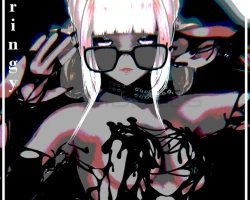


Model info
Content type:Avatars
Сreated by: Cringyvr
SDK: 3.0 (VRChat)
Unity version: Unity 2022
Platform:
PC + Quest
Рhysbones: Yes
Face Tracking: Yes
Full body: Yes
Nsfw: Yes
DРS \ SPS : No
Views: 32 302
Goopy!
To download the model, you need to log in.
Description
Goopy the Undead Slime! 18+
Features:
Slime sticks to the floor & body!
Slime Material Swaps - Glitter, See-through, Moving Slime, Opaque Gooey Slime!
Body contains a full set of Organ Plushies and a real skeleton!
Body Mat Swaps - Heterochromic transparency showing the skeleton, blurry transparency, cutout transparency only showing chest & arms skeleton, opaque body! (Heterochromic swap was added after the toggle showcase so its a bonus function!)
Slime Pole you can drop in the World!
VRCFT - Face & Eye Tracking Set up!
Uses Original Egirl Mesh - you can add extra outfits (available in Cringy.Store) without sculpting!
Colour swaps for Hair, Skintone, Eyes!
Moving Waves & Glitter in the Eyes!
Grab your glasses and put them on your head!
Instructions:
Create a New VRCC 2022 Avatar Project
Import VRCFT, VRCFury, Latest Poiyomi Repository
Import Goopy.unitypackage
Upload!
Free Uploads are available in the Cringecord Server
Features:
Slime sticks to the floor & body!
Slime Material Swaps - Glitter, See-through, Moving Slime, Opaque Gooey Slime!
Body contains a full set of Organ Plushies and a real skeleton!
Body Mat Swaps - Heterochromic transparency showing the skeleton, blurry transparency, cutout transparency only showing chest & arms skeleton, opaque body! (Heterochromic swap was added after the toggle showcase so its a bonus function!)
Slime Pole you can drop in the World!
VRCFT - Face & Eye Tracking Set up!
Uses Original Egirl Mesh - you can add extra outfits (available in Cringy.Store) without sculpting!
Colour swaps for Hair, Skintone, Eyes!
Moving Waves & Glitter in the Eyes!
Grab your glasses and put them on your head!
Instructions:
Create a New VRCC 2022 Avatar Project
Import VRCFT, VRCFury, Latest Poiyomi Repository
Import Goopy.unitypackage
Upload!
Free Uploads are available in the Cringecord Server
