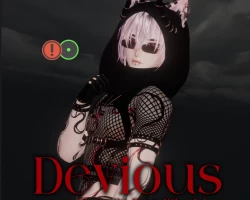
Home » Avatars » Devious

Model info

Content type:Avatars
Сreated by: PastelPlushies
SDK: 3.0 (VRChat)
Unity version: Unity 2022
Platform: PC + Opti
Рhysbones: Yes
Face Tracking: Yes
Full body: Yes
Nsfw: Yes
DРS \ SPS : Yes
Views: 15 942
Devious

To download the model, you need to log in.

Description


- Male and Trans-Masc Options
Male Version includes Wholesome SPS System
Trans-Masc Version includes SPS Bottom Growth System
The only difference in toggles between these two versions are the Funtime Features
- 4 Versions in each Package:

Full Version (SFW)
SPS Male Version
SPS TransMasc Version
Green Opti Version

- Includes Face Tracking for ALL Versions in separate package
- THIS MODEL IS NOT QUEST COMPATIBLE
- Uses Hai's Prefabulous Normals correction for better flat chest shading
- Uses Poiyomi Version 9.2.41 (or newer)
- Dissolve Toggles & Fullbody Invis Dissolve
- Uses UV Discard system for more optimized material & mesh count
- Fullbody compatible
- Physbones setup
- Audiolink Reactive
- Twist Joints in entire body
- Gogo Locomotion
- Custom gestures & expressions
- Physbones disabled w/ each toggleable item (hairstyles, necklace, etc)

Body Settings:
Hair Menu: 6 Hairstyle Combos, Emissive Tips Toggles (Dim, Bright, White & Hue Shift), Dark Tips, Brightness/Color Slider & Hue Shift Slider
Species Menu: Ears, Tail, Small Horns & Large Horns, Black Schlera & Bloodlust Eyes
Makeup Menu: Liptint, Lipstick, Eyeshadow, Body Glitter, Wet/Sweaty Skin, Black Schlera & Tattoos
Nails Menu: Nail Color & Long Nails Toggle
Piercings Menu: Stretched Ears, Ear Tunnels Toggle & Scale, Ear Piercings, Brow Rings, Nose Ring, Lip Rings & Body Piercings
Body/Skin Menu: Realistic/Toon Lighting Swap, Face Shadow, Wet/Sweaty Skin, Muscles, Top Scars, Flat Chest, Bloodlust Eyes & Body Hair
Sliders Menu: Body Thiccness, Butt Scale, Ear Tunnel Scale, Skintone, Avatar Brightness, Eyes Hue Shift & Overall Hue Shift
Closet:
Clothes Menu: Bodysuit, Turtleneck, Jeans, Boxers, Underwear & Boots
Harness Menu: Armlets, Bracelets, Choker, Chest, Waist, Belt & Garters
Accessories Menu: Glasses, Mask, Hood, Scarf & Gloves
Jewelry Menu: Earrings, Choker, Necklace, Bracelets, Armlets & Rings
Colors:
Links to Hair, Makeup, Nails & Body Menus for easy access
Clothing Swaps: Tops, Jeans, Harness, Accessories & Underwear Color Sliders, Color Swap Bodysuit Opaque or Fishnet, and Glasses/Shades Swap
Color Sliders: Avatar Brightness, Skintone, Eyes Hue & Overall Hue
Randomize Colors button in separate Menu
Extras:
Fullbody Dissolve/Disappear Toggle
Knife System by robocap
Hand Particles for Dancing

UPLOAD INSTRUCTIONS:
Download Unity 2022.3.22f1
Download VRC Creator Companion (aka VCC) from link above on VRC website
Launch VCC and create new avatar project
The VRCSDK is built into VCC so no file import is necessary for this!
Import Poiyomi Shader
Import VRCFury (can also be added to project using repository/project add-ons)
Import Modular Avatar Tool (add with repository is recommended, see step below)
Import Hai's Prefabulous Tool (add with repository, it will also automatically add modular avatar and other required files)
IF USING FACETRACKING, Import Jerry's FT Templates (add with repository is recommended)
Import model package
Open model scene named !! DEVIOUS
Open VRCSDK Menu and build and publish! Please be sure to ONLY upload this model privately, even if it's edited. Public uploads ARE NOT ALLOWED

VRC Creator Companion
Poiyomi Shader
VRCFury
Modular Avatar
Hai's Prefabulous Tools
Jerry's FT Prefab

This item is a non-refundable digital product. For additional help with uploads/questions etc please open a ticket in my DISCORD SERVER
Screenshots of model Devious in the game
Comments: 18
Add comment

Information

To add your comment you need to log in.

  • foto
    peachiepie (user blocked for violating site rules) #18
    Quote: MothMommy
    @Teakaee dumbass, learn to read - I already said renaming files doesn't work on my pc, and yes, I did try yours again just in case


    this is totally the way someone is gonna help you :) hopefully you can get that figured out on your own because you're being a fucking horrible bitch. Either get your shit together and learn how to use unity or shut the fuck up. You're the whiny bitch who doesn't know how to get her own head out of her ass. GGs your future is as sad as the dark mode on this website. Literally biting the hand thats trying to feed you.
    10 November 2025 13:59
  • foto
    Teakaee #17
    +1
    MothMommy, Lol wow just seeing this, you're definitely a raging cunt. Skill issue.
    10 November 2025 13:51
  • foto
    freakiestfreakbob #16
    +2
    MothMommy, i figured out that if you unzip the unitypackage thing and just drag the folder into the unityproject it works just fine! i was able to upload with no issues :)
    2 November 2025 06:34
  • foto
    MothMommy #15
    -6
    @Teakaee dumbass, learn to read - I already said renaming files doesn't work on my pc, and yes, I did try yours again just in case
    2 November 2025 04:34
  • foto
    Teakaee #14
    0
    Teakaee, ALSO, if your build failed, in the hierarchy search bar put in NORMAL RECALC and delete anything
    1 November 2025 15:52
  • foto
    Teakaee #13
    0
    freakiestfreakbob, Your guyses packages are titled 'Devious.unitypackge' but are hiding a .bz after that, show hidden details and/or change the type to Devious.unitypackage.unitypackage. Problem solved c:

    MothMommy, Your guyses packages are titled 'Devious.unitypackge' but are hiding a .bz after that, show hidden details and/or change the type to Devious.unitypackage.unitypackage. Problem solved c:
    1 November 2025 15:35
  • foto
    freakiestfreakbob #12
    0
    has anyone figured out how to fix it yet? when i unzip them its just folders :(
    1 November 2025 14:24
  • foto
    gamingnerd #11
    0
    its not working
    21 October 2025 15:59
  • foto
    MothMommy #10
    -1
    renaming files don’t seem to work for me so if anybody can help, DM for my discord :’) please,,
    19 October 2025 03:53
  • foto
    Silent Witness #9
    0
    cutepuppypup,
    Thanks cutie,

    Ghostlyanon,
    probs because of the windows 11 and 10 problems , but it's working on my end and also i am sure the VRModels mods checked on the link and files and working also before publish it to the website.

    try cutepuppypup, method it might work
    17 October 2025 01:00
  • foto
    Ghostlyanon #8
    0
    FBTISNOTHERE, When I try to open it into the scene, it just opens to all the folders
    16 October 2025 16:02
  • foto
    cutepuppypup #7
    +1
    FBTISNOTHERE, extract it then change the type of file by right clicking and going to properties then just remove the gz from the end of it and it should become a regular unity package
    16 October 2025 13:09
  • foto
    Silent Witness #6
    0
    anime20
    bobthedonkey.,
    Ghostlyanon,


    Brokenrose,
    sadly not ,</3
    16 October 2025 11:05
  • foto
    bobthedonkey. #5
    Imagine getting a badge put on my account because I pointed out something what is a fact about it LMAO what an idiot


    16 October 2025 05:33
  • foto
    Ghostlyanon #4
    0
    When I open the zip file I'm just seeing a whole bunch of folders and not the actual unity package?
    16 October 2025 05:11
  • foto
    Brokenrose #3
    +1
    thank youuuu :3 and do you have the full fan service for vesper by any chance? the vesper on here doesnt have the fan service version sadly.
    16 October 2025 00:32
  • foto
    bobthedonkey. #2
    no package just 7000 folders
    15 October 2025 05:05
  • foto
    Riri1998 #1
    0
    ***comment deleted***
    15 October 2025 02:02