

Model info
Content type:Avatars
Сreated by: HeyltsChin
SDK: 3.0 (VRChat)
Unity version: Unity 2022
Platform:
PC+ Opti + Quest
Рhysbones: Yes
Face Tracking: Yes
Full body: Yes
Nsfw: Yes
DРS \ SPS : Yes
Views: 36 895
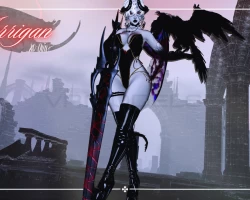
Morrigan
To download the model, you need to log in.
Description
✧ Tops: Crop Top, Gem Bodysuit, Full Bodysuit, Lingerie Bra, Pasties
✧ Bottoms: Coffin Underwear, Lingerie Panties, Lingerie Garter, Skirt
✧ Shoes: Thigh High Boots, Heels
✧ Clothing Black or White Swap
✧ Bat Garter
✧ Blindfold
✧ Choker
✧ Earrings
✧ Glasses
✧ Face Chain
✧ Necklaces
✧ Waist Harness
✧ Demon: Fancy Horns, Small Horns, Wings, Tail
✧ Cat: Ears, Tai
✧ Body Sliders: Boobs +, Boobs -, Butt +, Butt -, Thighs -, Thiccness +
✧ Skin Tones Radial: Grey, Red (*with hue*), Light, Tan, Dark, Darkest
✧ Eyes Color: Red (*with hue*), White, Black
✧ Eyes Back: White or Black
✧ Tattoos On/Off
✧ Tattoos Emission (*very subtle*)
✧ Makeup On/Off
✧ Metal Hue Shift
✧ Grim The Crow: ✧
✧ Spawn -> flies in and lands on left arm
✧ World Toggle -> turns giant and spawns in front of avatar
✧ World Attack -> Attacks by flying up and using claws to attack whats in front of him
✧ World Drop
✧ Sword System ✧
✧ Grabbable off back
✧ Slash effect when sword is swung quickly
✧ World Drop
✧ Necklace Contact ✧
✧ Touch necklace with right hand making open hand gesture to activate (**expressions + toggle both must be turned on for this to work)
✧ Plays custom animation to turn on tattoos -> starts crawling up the arm as a dark red color and fades to black as it reaches top of arm
✧ Touch necklace again with right hand (any other gesture) to turn off
✧ Full GoGo Loco
✧ Full SPS
✧ Fake Index Gestures
✧ Expressions Toggle
✧ Necklace Contact Toggl
✧⋆・゚┊ Uses Unity version 2022.3.6f1
✧⋆・゚┊Requires Creator Companion to upload (if you need a tutorial on how to upload, click here). Please use the SDK version 3.7.0
✧⋆・゚┊Install VRCFury *must install for Quest too* -> You can add it to Creator Companion by clicking here,. Please use version 1.1087.0
✧⋆・゚┊Poiyomi Toon 9.0.54
•─────⋅☾⋄✧⋄☽⋅─────•
Import Order:
1. Start a new project with the VRCC (Creator Companion)
2. Add VRCFury to your project
3. Add in Poiyomi Shader
4. Install Avatars Unity Project
5. Click on the scene available in the package called "Open Me" (if different prefabs for skin tones are shown, hide the others and choose the one you want to upload)
6. Upload via the SDK
✧⋆・゚┊ *remember, if any materials show as pink, make sure to click them and hit unlock!*
✧⋆・゚┊To upload the Quest package, make a new project and add VRC Fury and the avatars Quest package. Go to your SDK and click copy ID on the PC version of your avatar, and paste that onto your quest avatars descriptor. Proceed to upload.
✧ Bottoms: Coffin Underwear, Lingerie Panties, Lingerie Garter, Skirt
✧ Shoes: Thigh High Boots, Heels
✧ Clothing Black or White Swap
✧ Bat Garter
✧ Blindfold
✧ Choker
✧ Earrings
✧ Glasses
✧ Face Chain
✧ Necklaces
✧ Waist Harness
✧ Demon: Fancy Horns, Small Horns, Wings, Tail
✧ Cat: Ears, Tai
✧ Body Sliders: Boobs +, Boobs -, Butt +, Butt -, Thighs -, Thiccness +
✧ Skin Tones Radial: Grey, Red (*with hue*), Light, Tan, Dark, Darkest
✧ Eyes Color: Red (*with hue*), White, Black
✧ Eyes Back: White or Black
✧ Tattoos On/Off
✧ Tattoos Emission (*very subtle*)
✧ Makeup On/Off
✧ Metal Hue Shift
✧ Grim The Crow: ✧
✧ Spawn -> flies in and lands on left arm
✧ World Toggle -> turns giant and spawns in front of avatar
✧ World Attack -> Attacks by flying up and using claws to attack whats in front of him
✧ World Drop
✧ Sword System ✧
✧ Grabbable off back
✧ Slash effect when sword is swung quickly
✧ World Drop
✧ Necklace Contact ✧
✧ Touch necklace with right hand making open hand gesture to activate (**expressions + toggle both must be turned on for this to work)
✧ Plays custom animation to turn on tattoos -> starts crawling up the arm as a dark red color and fades to black as it reaches top of arm
✧ Touch necklace again with right hand (any other gesture) to turn off
✧ Full GoGo Loco
✧ Full SPS
✧ Fake Index Gestures
✧ Expressions Toggle
✧ Necklace Contact Toggl
✧⋆・゚┊ Uses Unity version 2022.3.6f1
✧⋆・゚┊Requires Creator Companion to upload (if you need a tutorial on how to upload, click here). Please use the SDK version 3.7.0
✧⋆・゚┊Install VRCFury *must install for Quest too* -> You can add it to Creator Companion by clicking here,. Please use version 1.1087.0
✧⋆・゚┊Poiyomi Toon 9.0.54
•─────⋅☾⋄✧⋄☽⋅─────•
Import Order:
1. Start a new project with the VRCC (Creator Companion)
2. Add VRCFury to your project
3. Add in Poiyomi Shader
4. Install Avatars Unity Project
5. Click on the scene available in the package called "Open Me" (if different prefabs for skin tones are shown, hide the others and choose the one you want to upload)
6. Upload via the SDK
✧⋆・゚┊ *remember, if any materials show as pink, make sure to click them and hit unlock!*
✧⋆・゚┊To upload the Quest package, make a new project and add VRC Fury and the avatars Quest package. Go to your SDK and click copy ID on the PC version of your avatar, and paste that onto your quest avatars descriptor. Proceed to upload.
