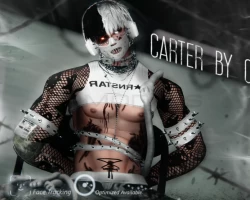


Model info
Content type:Avatars
Сreated by: Chrisvr
SDK: 3.0 (VRChat)
Unity version: Unity 2022
Platform:
PC+ Opti + Quest
Рhysbones: Yes
Face Tracking: Yes
Full body: Yes
Nsfw: Yes
DРS \ SPS : Yes
Views: 35 825
Carter
To download the model, you need to log in.
Description
- 𝘔𝘢𝘪𝘯 -
Physbones
Face tracking (UE Blendshapes)
SPS set up
Newest GoGoLoco
Fake Index Gestures
FBT Ready (Tested and used for dancing)
100+ toggles
Plushies Everywhere!!!!
Comes with 8 different hairstyles
Quest Version
Optimized Version
Matching Female Model by Ivory
- How to use -
When Purchased, you will be provided the poiyomi shader used (7.3.50 to 9.1.30) and the Unity Package for the avatar. VrChat Creator Companion will be needed to upload this model.
If you don't have vrcfury go here (https://vrcfury.com/download) and you add vrcfury to the Repository which should be in the settings of the VrChat Creator Companion
Click on (Create New Project) at the top right corner. Make sure to have unity Version (2022.3.22f1) and once you click on unity 2022 Avatar project name your Project. Once you do that make sure to go to (Manage Project) in the Creator Companion and add VRCFury tool.
Go back to the Project and Import Poiyomi (The one stated above)
Import the Avatars Unity Package ( It will take a min for it to import don't worry)
Click on (OPEN ME) scene, and upload from there ( It will take some time to upload)
Physbones
Face tracking (UE Blendshapes)
SPS set up
Newest GoGoLoco
Fake Index Gestures
FBT Ready (Tested and used for dancing)
100+ toggles
Plushies Everywhere!!!!
Comes with 8 different hairstyles
Quest Version
Optimized Version
Matching Female Model by Ivory
- How to use -
When Purchased, you will be provided the poiyomi shader used (7.3.50 to 9.1.30) and the Unity Package for the avatar. VrChat Creator Companion will be needed to upload this model.
If you don't have vrcfury go here (https://vrcfury.com/download) and you add vrcfury to the Repository which should be in the settings of the VrChat Creator Companion
Click on (Create New Project) at the top right corner. Make sure to have unity Version (2022.3.22f1) and once you click on unity 2022 Avatar project name your Project. Once you do that make sure to go to (Manage Project) in the Creator Companion and add VRCFury tool.
Go back to the Project and Import Poiyomi (The one stated above)
Import the Avatars Unity Package ( It will take a min for it to import don't worry)
Click on (OPEN ME) scene, and upload from there ( It will take some time to upload)
