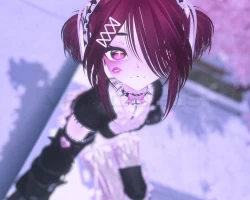
Home » Avatars » ૮₍˶ •. • ⑅₎ა ♡ 「 ✦ Berry Sweet ✦ 」

Model info

Content type:Avatars
SDK: 3.0 (VRChat)
Unity version: Unity 2022
Platform: PC + Quest
Рhysbones: Yes
Face Tracking: No
Full body: Yes
Nsfw: Yes
DРS \ SPS : Yes
Views: 39 637
૮₍˶ •. • ⑅₎ა ♡ 「 ✦ Berry Sweet ✦ 」

To download the model, you need to log in.

Description


˗ˏˋ ★ ― 𝐓𝐨𝐠𝐠𝐥𝐞𝐬 ‼
𓂃𓏲࣪ ʚ 𝐇𝐚𝐢𝐫 。°˖

┊... Long Hair
┊... Ponytails

𓂃𓏲࣪ ʚ 𝐂𝐥𝐨𝐭𝐡𝐢𝐧𝐠 。°˖

┊... Top
┊... Panties
┊... Bodysuit
┊... Leg Warmers
┊... Shoes
┊... Short Socks
┊... Skirt
┊... Slack Socks
┊... Thigh Highs

𓂃𓏲࣪ ʚ 𝐀𝐜𝐜𝐞𝐬𝐬𝐨𝐫𝐢𝐞𝐬 。°˖

┊... Belt
┊... Choker
┊... Envelope
┊... Garters
┊... Hair Ribbons
┊... Headband
┊... Leg Laces

𓂃𓏲࣪ ʚ 𝐒𝐩𝐞𝐜𝐢𝐞𝐬 。°˖

┊... Bunny Ears
┊... Bunny Tail

𓂃𓏲࣪ ʚ 𝐂𝐨𝐥𝐨𝐫𝐬 。°˖

┊... Hair White/Red
┊... Hair Hue
┊... Clothing White
┊... Eye Hue
┊... Clothing Hue
┊... 4 Skin Tones

𓂃𓏲࣪ ʚ 𝐄𝐱𝐭𝐫𝐚 。°˖

┊... Gogo Locomotion
┊... ARKit Face Tracking
╰┈┈┈➤ ☆⋆。𖦹°‧★

⎯⎯⎯⎯✮ Stats ✮⎯⎯⎯⎯⎯
→ Rating: Very Poor
→ In game size: 57 MB
→ VRAM: 282 MB
→ Triangles: 328 k

Screenshots of model ૮₍˶ •. • ⑅₎ა ♡ 「 ✦ Berry Sweet ✦ 」 in the game
Uploaded by

Anonymous


Comments: 12
Add comment

Information

To add your comment you need to log in.

  • foto
    Pirata_pr #12
    0
    The avatar has a little problem. When you're only on Android, people on PC can see you naked. But not to yourself, but when you're on PC, with that avatar, people on Android can see you naked
    Thursday at 09:36
  • foto
    Bakuuu9 #11
    0
    hi, if you can't find the green circles, in the projects tab go into !Femcelle > FBX
    then click on berrysweet, then in the inspector you can easily find the RIG then you just click CONFIGURE which is below it, then drag the HIPS from hierarchy tab from the left into the HIPS on the right inspector tab into the box next to the green circle hips
    27 April 2026 08:33
  • foto
    Wonderhow #10
    +2
    dead_c0rps3, on Unity, on the "VR Chat SDK" panel after logging in, you'll see at the bottom right corner a "Platforms" with a small dropdown list. If you wanted the same avi in both PC and Quest you would select both Windows and Android. In this particular case you have one PC avi and a simplified version for Quest. What you have to do is upload the Windows version as Windows. After uploading, copy the blueprint of the avi. Then you're gonna upload the Quest version as "Android", but before uploading it you will paste the blueprint from the PC version. That way the game will know it's the same avi but for Quest users.
    10 December 2025 10:20
  • foto
    dead_c0rps3 #9
    0
    could someone tell me how to make it for pc and quest, i cant get it to work
    8 December 2025 15:27
  • foto
    Pyrite #8
    0
    im quite new to this can someone truly dumb it down for me on how to fix the hips
    21 November 2025 11:43
  • foto
    stctp03 #7
    +2
    anyone have the issue where the skirt laces are stuck floating in air when using gogo to sit/lay
    7 November 2025 11:19
  • foto
    gunber1goober #6
    +2
    In the bone mapping, look at the “Hips” field.

    If the Hips are assigned to the Armature Root (like “Armature” or “Root”), that’s wrong.

    Expand your bone hierarchy in the left panel — find the actual hips bone (usually named something like Hips, Pelvis, or similar).

    Drag that correct bone into the Hips slot.

    ✅ You should now see the green checkmark on the “Hips” field.
    6 November 2025 11:55
  • foto
    E1One #5
    +11
    To fix the "Hips" issue you're going to have to select the model's prefab which will be at the top of the inspector when you click the avatar in the hierarchy.

    From there you will go to Rig then to Configure. Locate the green circle that is under the Body section labeled as "Hips" but incorrectly has "Armature" linked to it. Either drag "Hips" from the hierarchy into that space to replace "Armature" or click the dot-circle and select "Hips" from there.
    5 November 2025 18:46
  • foto
    Tyler Fives #4
    +1
    has anyone found out how to fix the fbx rig problem
    5 November 2025 15:48
  • foto
    VaeVictus #3
    +3
    anyone else getting: your avatar's fbx rig definition has the 'Hips' bone set incorrectly to the armature root instead of the actual hips
    5 November 2025 08:49
  • foto
    HatsuneMiku #2
    +1
    What is special about this version compared to the other one??
    5 November 2025 07:23
  • foto
    Sleepi_Amygdala #1
    0
    Uh-
    5 November 2025 06:53