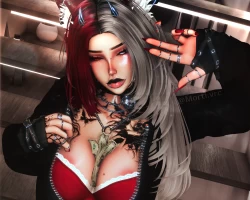


Model info
Content type:Avatars
Сreated by: Rebruising
SDK: 3.0 (VRChat)
Unity version: Unity 2022
Platform:
PC + Opti
Рhysbones: Yes
Face Tracking: Yes
Full body: Yes
Nsfw: Yes
DРS \ SPS : Yes
Views: 17 810
Bexley
To download the model, you need to log in.
Description
TWO OPTIS INCLUDED IN PACKAGE
FEATURES
UNITY 2022.3.22f1
Face Tracking
GoGo Loco
Fake Index
Custom Idle Animation (Blink)
Customization (Color Swaps, Hue Shifts, Skin Colors, Metal, etc.)
SPS
Lighting Sliders
Seamless neck merge
AVATAR UPLOAD INSTRUCTIONS
1. Download zip folder
2. Unzip folder
3. Open VCC > click "add existing project"
4. Select the UNZIPPED folder
5. Project will add to your VCC list, open it
6. Give it a minute to open
7. IF SCENE IS EMPTY, locate avatar folder name and open the scene
THIS COMES AS A PROJECT FOLDER. NOT A UNITYPACKAGE. MAKE SURE TO MOVE THE FOLDER INTO YOUR UNITY PROJECT FOLDER LOCATION
FEATURES
UNITY 2022.3.22f1
Face Tracking
GoGo Loco
Fake Index
Custom Idle Animation (Blink)
Customization (Color Swaps, Hue Shifts, Skin Colors, Metal, etc.)
SPS
Lighting Sliders
Seamless neck merge
AVATAR UPLOAD INSTRUCTIONS
1. Download zip folder
2. Unzip folder
3. Open VCC > click "add existing project"
4. Select the UNZIPPED folder
5. Project will add to your VCC list, open it
6. Give it a minute to open
7. IF SCENE IS EMPTY, locate avatar folder name and open the scene
THIS COMES AS A PROJECT FOLDER. NOT A UNITYPACKAGE. MAKE SURE TO MOVE THE FOLDER INTO YOUR UNITY PROJECT FOLDER LOCATION
