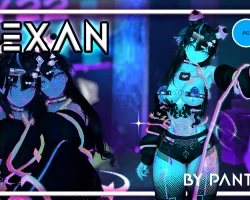


Model info
Content type:Avatars
Сreated by: Panthervrc
SDK: 3.0 (VRChat)
Unity version: Unity 2022
Platform:
PC + Quest
Рhysbones: Yes
Face Tracking: Yes
Full body: Yes
Nsfw: Yes
DРS \ SPS : Yes
Views: 34 432
Vexan
To download the model, you need to log in.
Description
𝗛𝗼𝘄 𝘁𝗼 𝗨𝗽𝗹𝗼𝗮𝗱 VEXAN! (2 EASY-WAYS)
1.-
· UNPACKAGE/UNFOLD the folder you downloaded.
· Open VCC (Unity 2022.3.22f1).
· ADD ''Existing Project''.
· OPEN the folder you UNPACKAGED.
· ADD manually SPS - GOGOLOCO - VRC FURY - POIYOMI - LILTOON (VERY IMPOTANT).
· OPEN THE PROJECT (Unity).
· LAST STEP, open the folder called ''VEXAN'', and then ''OPEN ME!'' (Unity Icon).
· You ALL SET!
2.-
· Download the UNITY PACKAGE.
· Open VCC (Unity 2022.3.22f1).
· CREATE a NEW PROYECT.
· ADD manually SPS - GOGOLOCO - VRC FURY - POIYOMI - LILTOON (VERY IMPORTANT).
· OPEN THE PROJECT (Unity).
· LAST STEP, open the folder called ''VEXAN'' and then ''OPEN ME!'' (Unity Icon).
· You ALL SET!.
How to UPLOAD VEXAN PC-QUEST VERSION?
This is actually really simple! (How I usually do it)
· Once you have Uploaded the PC VERSION.
· From the same Unity Project, Open ''VRChat SDK''.
· In the third step, where it says ''Platform(s)'' change it to ''Android'' only.
· Click on ''-❤ Vexan ❤-'' at your left side. Scroll down until you find ''Pipeline Manager (Script)''.
· Copy the ''BLUEPRINT ID'' that was generated from the PC VER. to the ''-❤ Vexan ❤- QUEST (Android - UPLOAD)'' avatar.
· LAST STEP, Go back to VRChat ASK and UPLOAD THE AVI! YOU ALL SET.
What do you have to include inside the package? (Has to be ADDED IN VR Creator Companion):
· Liltoon (Ver. 2.3.2)
· Poiyomi (Ver. 9.2.79)
· VRCFury (Ver. 1.1258.0)
· SPS (Ver 2.0.11)
· GOGO (Ver 1.8.6)
1.-
· UNPACKAGE/UNFOLD the folder you downloaded.
· Open VCC (Unity 2022.3.22f1).
· ADD ''Existing Project''.
· OPEN the folder you UNPACKAGED.
· ADD manually SPS - GOGOLOCO - VRC FURY - POIYOMI - LILTOON (VERY IMPOTANT).
· OPEN THE PROJECT (Unity).
· LAST STEP, open the folder called ''VEXAN'', and then ''OPEN ME!'' (Unity Icon).
· You ALL SET!
2.-
· Download the UNITY PACKAGE.
· Open VCC (Unity 2022.3.22f1).
· CREATE a NEW PROYECT.
· ADD manually SPS - GOGOLOCO - VRC FURY - POIYOMI - LILTOON (VERY IMPORTANT).
· OPEN THE PROJECT (Unity).
· LAST STEP, open the folder called ''VEXAN'' and then ''OPEN ME!'' (Unity Icon).
· You ALL SET!.
How to UPLOAD VEXAN PC-QUEST VERSION?
This is actually really simple! (How I usually do it)
· Once you have Uploaded the PC VERSION.
· From the same Unity Project, Open ''VRChat SDK''.
· In the third step, where it says ''Platform(s)'' change it to ''Android'' only.
· Click on ''-❤ Vexan ❤-'' at your left side. Scroll down until you find ''Pipeline Manager (Script)''.
· Copy the ''BLUEPRINT ID'' that was generated from the PC VER. to the ''-❤ Vexan ❤- QUEST (Android - UPLOAD)'' avatar.
· LAST STEP, Go back to VRChat ASK and UPLOAD THE AVI! YOU ALL SET.
What do you have to include inside the package? (Has to be ADDED IN VR Creator Companion):
· Liltoon (Ver. 2.3.2)
· Poiyomi (Ver. 9.2.79)
· VRCFury (Ver. 1.1258.0)
· SPS (Ver 2.0.11)
· GOGO (Ver 1.8.6)
