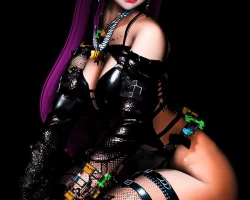
Home » Avatars » Alex

Model info

Content type:Avatars
Сreated by: Boricua
SDK: 3.0 (VRChat)
Unity version: Unity 2022
Platform: PC
Рhysbones: Yes
Face Tracking: No
Full body: Yes
Nsfw: Yes
DРS \ SPS : Yes
Views: 24 510
Alex

To download the model, you need to log in.

Description

WHAT DO YOU NEED
This avatar uses
VRCC 2022.3.22F1
VRCFury
Poyomi 7.3
SDK 3.7.6
SPS

PC ONLY
10 HAIRS
5 SHOES
17 TOP
13 BOTTOM
16 ACCESORIES
8 JEWERLY
**All clothes can be mixed
EARS, TAIL
ELF EARS
FAKE INDEX
SKIN TONE
EYE COLOR,HAIR COLOR
CLOTHES COLOR CUSTOMIZATION
FBT READY
GOGO
SPS
FACIAL GESUTRES
CUSTOM MENU ICONS
PHYSICS BONES WITH REALISTIC PHISICS
FBT READY
Screenshots of model Alex in the game
Comments: 16
Add comment

Information

To add your comment you need to log in.

  • foto
    ShadowRose8912 #16
    0
    C Pz, yeah im using vcc, and even with the resolver tool it didnt fix anything
    5 June 2026 03:11
  • foto
    C Pz #15
    0
    ShadowRose8912, Are you using VR chat creator companion? With the Vrchat resolver tool package it should automatically give you the option to lock whatevers needed while uploaing.
    5 June 2026 03:02
  • foto
    ShadowRose8912 #14
    0
    Alex is so fucking broken..it keeps telling me that it cant lock the materials on upload and ive checked the error console but i have no idea how to deal with the null thing that keeps popping up, ive put everything in that she needed before i put the actual avatar in the project and it still gives the same errors
    2 February 2026 19:12
  • foto
    Clawed69 #13
    0
    AdvisorywolfKitty, can u tell how its telling me its not compressed enough
    2 February 2026 14:58
  • foto
    bulgaofdoom #12
    0
    AdvisorywolfKitty, how? mine keeps saying i have to delte the sps and delete some (clone) im very new so idk
    1 February 2026 00:05
  • foto
    AdvisorywolfKitty #11
    +1
    easy upload, love the avatar.
    26 January 2026 09:46
  • foto
    AshyNL010 #10
    coolmanzzz, maybe learn how to use unity lol. it works perfectly fine just compress the textures.
    24 January 2026 05:46
  • foto
    ballpunch #9
    0
    ***comment deleted***

    GhoulTTV FN, Thanks, this worked! thx 2 uploader as well.
    24 January 2026 03:42
  • foto
    coolmanzzz #8
    0
    This avatar cant upload for shit
    24 January 2026 03:07
  • foto
    coolmanzzz #7
    +1
    GhoulTTv FN, Where do you go to do that?
    24 January 2026 02:34
  • foto
    GhoulTTV FN #6
    Go to build settings and compress the size to 1024 and fast compression it will upload after that :)
    23 January 2026 20:59
  • foto
    ballpunch #5
    0
    Too big to upload too VRChat
    23 January 2026 19:40
  • foto
    jay938 #4
    0
    when i try to upload it says the avi is to large anyone know how to compress it
    23 January 2026 18:18
  • foto
    AshyNL010 #3
    LordRevan92, steve im its in moderation atm it wil be up soon here to
    23 January 2026 07:30
  • foto
    LordRevan92 #2
    0
    whats the males name?
    23 January 2026 06:49
  • foto
    shady shifts #1
    0
    ***comment deleted***
    23 January 2026 01:42