Home » Avatars » XIA

Model info

Content type:Avatars
Сreated by: Baz
SDK: 3.0 (VRChat)
Unity version: Unity 2022
Platform: PC
Рhysbones: Yes
Face Tracking: Yes
Full body: Yes
Nsfw: Yes
DРS \ SPS : Yes
Views: 17 899
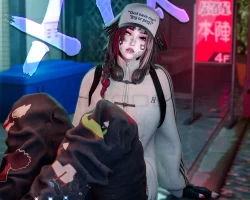
XIA

To download the model, you need to log in.

Description


SPS , PHYSBONES & GOGOLOCO
Matching female model to Hazie's "XIN" male

FEATURES
▹ PC - Face Tracking - QUEST Compatible
▹ SPS [ mouth, hand, pp ]
▹ Cool accessories (Coin Flip system, Weapons, Soda Can ETC)
▹ Pet follower (Dog)
▹ FACES [ Moon & Queen & Luck ]
▹ Blinking animation
▹ GogoLoco Setup
▹ HAIRS 8 Hairs [ Buns Long, Lol Ponytail, Luck Ponytail, Moon Long, Moon Ponytail, Queen Braid Long, Queen Braid Side, Short ]
▹ CLOTHES [ 4 Hats (Cap, Visor, Beanie, Cat Beanie), Dress shirt, 2 Jackets (Bomber jacket, Sweater), 3 Hero suits (Moon, Queen, Luck, Loli), Loli Helmet, Queen Spear, Queen Accessories & Boots, Luck Gloves & Shoes, Pin gloves & socks, Normal socks, Leg Fishnets, 5 Pants (Cargo, Jorts, Jeans, Suit pants, Skirt, boxer variants), 3 Shoes (Winged tops, tops, Boots), T-shirt]
▹ ACCESSORIES [ Belt, Choker, Dufflebag, Eyepatch, 2 pairs of Glasses, Hair pins, Headphones, Leg Star, Nails, Smiley Chain, Gboy, Tie, Bandaids, Piercings, Necklaces, Rings & bracelets, Weapons, Soda Can ]
▹ SPECIES [ Horns, Elf Ears, 3 Ears (Dog, Cat, Bunny), 2 Tails (Fluffy, Bunny) ]
▹ PET [ Dog Companion Follower ]

COLOR MODIFICATIONS:
▹ HAIR [ 3 Sliders for Hair Colors ] 23 COLORS !
▹ EYES [ Eye Color Toggle (Colored, White & Black), Right & Left Eye Saturation & Hue shift ]
▹ OUTIFT + BODY [ Color swap for every clothing & accessory piece, Nails, T3 Hair Color sliders, Skin Color Slider, Eyelashes Color, Eyebrows Color, Eye Saturation L & R, Eye Hue L & R, Tattoos ]
▹ BODY MODIFICATIONS [ 3 FACES, Elf Ears, SPS Setup ]
▹ INTERACTIONS [ Pet Dog, SPS Contacts (Mouth/pp) ]

HOW TO UPLOAD:
Make sure to have the latest versions of every program !
Use UNITY 2022 - CREATOR COMPANION
Import the basics (sdk etc) and VRC Fury
Import Poiyomi Toon 7.3.50 - 9.1.30
Import Warren's Fur Shader
Import Jerry's Face Tracking (even if you don't use FT)

Quest Version:
Use VCC 2022!
Switch the platform to Android. ( File --> Build Settings --> Android --> Build and run. )
Import VRCFury
Import Avatar package
Screenshots of model XIA in the game
Uploaded by

Chlo


Comments: 14
Add comment

Information

To add your comment you need to log in.

  • foto
    SikeE #14
    0
    Could someone send me the working zip please?
    3 March 2026 02:29
  • foto
    Wolfy103 #13
    0
    Tested on desktop and it dropped my fps to 20 wtf such a cool avi but can't use like this
    18 February 2026 04:22
  • foto
    miqyti #12
    0
    The sweater toggles of when i put on the avatar after toggleing , i checked parameters and it looks right, but still dosent work, how do i fix it?
    17 February 2026 06:55
  • foto
    simpforacid #11
    0
    i imported it with jerrys ft and allat and even made sure to upload the ft one but theres still no ft
    16 February 2026 07:02
  • foto
    itzimoto #10
    0
    ***comment deleted***
    16 February 2026 05:08
  • foto
    VRModels #9
    itzimoto, You're hopeless.
    Use WINRAR.
    anime155
    16 February 2026 04:31
  • foto
    itzimoto #8
    0
    You people are hopeless...
    convert RAR file to ZIP and import as usual...
    I used
    {https : //cloudconvert . com/rar-to-zip }


    worked fine for me.
    16 February 2026 03:52
  • foto
    IMADRAGON #7
    0
    Im having same issue will not open
    15 February 2026 23:45
  • foto
    Tonic303 #6
    0
    K.Z, do u know why even when i unzipped the file correctly, there avatar doesnt show up in unity?
    15 February 2026 23:05
  • foto
    moxiebb #5
    0
    its a corupted file it wont them me unzip the file at all no matter what i try
    15 February 2026 14:23
  • foto
    K.Z #4
    0
    MysticHorizon, i did that and now when i open the project in unity theres no avatar in the project its missing the only thing there is was the pet
    15 February 2026 13:22
  • foto
    MysticHorizon #3
    +4
    K.Z, I didn't have any issue unzipping the file. Use 7-zip, it's free online. With 7-zip you just right click and go to the 7-zip menu and "extract to" whatever the original file name it. Hoep this helps!
    15 February 2026 09:23
  • foto
    K.Z #2
    0
    K.Z, UPDATE: i figured out the issue after you download it right click on the file and click compress to.. and select ZIP file and use that one to upload the avatar
    15 February 2026 08:55
  • foto
    K.Z #1
    0
    The file doesn't work and gives an error message when trying to extract it from the zipped file
    15 February 2026 07:22