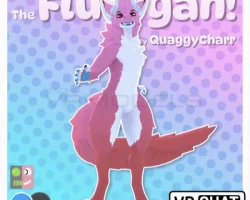


Model info
Content type:Avatars
Сreated by: Quaggycharr
SDK: 3.0 (VRChat)
Unity version: Unity 2022
Platform:
PC
Рhysbones: Yes
Face Tracking: Yes
Full body: Yes
Nsfw: Yes
DРS \ SPS : Yes
Views: 32 735
Fluffgan
To download the model, you need to log in.
Description
IMPORTANT NOTES:
++++This is not refundable++++
You are buying a digital copy; therefore, you cannot physically give the product back to fairly get your money back. I have a discord if problems arise please reach out there.
-This is NOT Quest Compatible but can be turned compatible (for the eyes turn on the lens blendshape to remove the glass)
-Texturing is done in Substance Painter
-Creator Companion recommended (you can get this through vrchat)
-VRCFURY is required for this project
-Poiyomi is used as the preferred shader
-This avatar will be receiving free updates over time
Features:
VRSDK3 package is setup for avatar 3.0
Physbones everywhere (toes, nose, hair, ears, butt, tail, cheek floof, tongue)
Unified Expressions for face tracking
Mouth and face visemes for vrchat/vtubing
Plethora of expressions
Contact interactions
Body modification blendshapes m/f gender expression and body shape
4 hair Styles
Clothing: Hoodie, Bra, male and female underwear, shorts
1 Tail option
4 horn styles to choose from
3 base color textures patterns
In this purchase you will receive:
FBT Vrchat Model
Face tracking with ear tracking
emotes with ear positions
Body modifications blendshapes
5 included clothing parts
A unity package containing the Fluffgan
Fbx files associated with the model
Substance Painter files associated
Main blender file
++++This is not refundable++++
You are buying a digital copy; therefore, you cannot physically give the product back to fairly get your money back. I have a discord if problems arise please reach out there.
-This is NOT Quest Compatible but can be turned compatible (for the eyes turn on the lens blendshape to remove the glass)
-Texturing is done in Substance Painter
-Creator Companion recommended (you can get this through vrchat)
-VRCFURY is required for this project
-Poiyomi is used as the preferred shader
-This avatar will be receiving free updates over time
Features:
VRSDK3 package is setup for avatar 3.0
Physbones everywhere (toes, nose, hair, ears, butt, tail, cheek floof, tongue)
Unified Expressions for face tracking
Mouth and face visemes for vrchat/vtubing
Plethora of expressions
Contact interactions
Body modification blendshapes m/f gender expression and body shape
4 hair Styles
Clothing: Hoodie, Bra, male and female underwear, shorts
1 Tail option
4 horn styles to choose from
3 base color textures patterns
In this purchase you will receive:
FBT Vrchat Model
Face tracking with ear tracking
emotes with ear positions
Body modifications blendshapes
5 included clothing parts
A unity package containing the Fluffgan
Fbx files associated with the model
Substance Painter files associated
Main blender file
