Home » Avatars » Yua

Model info

Content type:Avatars
Сreated by: Xutza
SDK: 3.0 (VRChat)
Unity version: Unity 2022
Platform: PC + Quest
Рhysbones: Yes
Face Tracking: Yes
Full body: Yes
Nsfw: Yes
DРS \ SPS : Yes
Views: 53 122
Yua

To download the model, you need to log in.

Description


.ᐟ.ᐟ FEATURES. ᐟ.ᐟ
⌈ 31 + Menus
⌈ Clothing Combos
⌈ Accessories menu.
⌈ Customizing menus.
⌈ Animations Wing, Blink. Ears and Tails.
⌈ Gogo loco.
⌈ Phys bones and colliders
⌈ SPS NSWF.
⌈ Texture swaps and hue shifts.
⌈ Avatar Size 86.32 MB.
⌈ Limb Scaling.
⌈ Lighting System .
⌈ Contact System.
⌈ VRCFT + Ears VRCFT ( VRCHAT FACE TRACKING )
⌈ Working Gun System.
⌈ Custom PC idles made by me.
⌈ Custom Icons
⌈ Has Neck merge
(Clothing & Accesories) AKA Toggles.

Ankle Monitor, Arm belts, Backpack, Belly Ring, Bracelets, Choker, Fluffy arm armers, Garter, Gun holder, Gun, Latex Bodysuit, Necklace, Rings, Sleeves, Small socks, Stockings, top belt, warmers legs, crown, glasses, robot headband, techparts, ears dog and cat, tails cat and dog, wings, Shorts, Skirt, Pants, 2 Jackets, Different Options for Bras and Panties, Boots, Small boots, Sneakers, Cyber boots, Slippers, Chunky Shoes, Bodysuit good girl, Boob cut top, Romper, Belt top, Dress, Long Sleeve.

Main Menu list. .ᐟ.ᐟ
➤ Hair Menu
Hair Options.
➢ 2 Pigtails, Long ponytail, Short, Long hair, Extra Hair front.
➢ 6 Bangs Options .

➤ Body options menu
➢ Skin tones Radial + Saturation Radial for infinite Options + Red color
➢ Eye Hue and Textures Combos. + HUE
➢ No Tattoo toggle.
➢ No Tattoo effect.
➢ Fishnet Radial.
➢ Face Marks.
➢ Black Sclera.
➢ Black Lip.

➤ Clothing Menus
Clothing
➢ Tops: Dress, Long Sleeve shirt, Bodysuit.
➢ Pants : Cargos, skirt, shorts.
➢ Shoes: Boots, Sneakers, Bow Boots , Chunky Shoes, Slippers.
➢ Lingerie : bra and panties.

➤ Accesories
➢ Ankle Monitor, Arm belts, Backpack, Belly Ring, Bracelets, Choker, Fluffy arm armers, Garter, Gun Holder, Gun, Latex Bodysuit, Necklace, Rings, Sleeves, Small socks, Stockings, top belt, warmers legs, crown, glasses, rob
ot headband, Tech parts, wings,

➤ Species
➢ Cat ears and Tail, Dog tail and ears, Elf ears + Cyber Wings

➤ Special Menu.
➢ Lighting System, Avatar Limb Scaling, Contacts, VRCFT. Working Gun Menu.

➤ Custom Menus
➢ Hair Custom Menu with Radials for the Each side Including Brightness, Saturation + Hue Shift, Includes Emission radial with saturation + Hue
➢ Clothing Colors: Pants Color and radials for color and hue + Tops color with radials for color and hue.
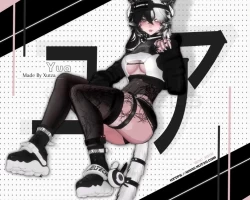
Screenshots of model Yua in the game
Comments: 30
Add comment

Information

To add your comment you need to log in.

  • foto
    Yuki kami #30
    0
    I am having issue with this avatar first time i ever had few issue with avatar uploading this site. Its not letting me upload avatar saying error i did all stuff and missing script on this avatar. I did all stuff always do for this avatar and also saying Delete ID when no ID on this avatar. So what should i do. I did everything for this avatar but missing one script some reason. Field to build and upload to vrchat.
    Saturday at 14:10
  • foto
    Nab86 #29
    0
    packed full of unneeded assets that bloat the fuck out the model. Even after an optimization run, this things was a fucking mess of 4k textures and poorly made normals. Dont waste you time.
    15 May 2026 20:43
  • foto
    Dyzzi_vr #28
    0
    how do you even get the thing in the unity thing
    13 March 2026 11:55
  • foto
    Marlo lopez #27
    +1
    it says pc and quest but there is only pc
    5 March 2026 11:58
  • foto
    Burrito #26
    +4
    Okay, To any of you having issues, first off let me make this as simple as possible.

    1. Download the ZIP file. Right-click and extract it. If you don’t have a tool built in for this, get 7zip, or winrar.

    2. In VCC (VRChat Creator Companion), click the down arrow in the top right and select "Add Existing Project."

    3. Open the project. You should know what to do from here. If you have any problems, let me know and I’ll help.
    28 February 2026 21:02
  • foto
    Darren Joe Clermont-Richard #25
    did the 1.0 one and saying having a error to extract code comes up to Error 0x8000FFFF:Catastrophic failure
    28 February 2026 06:32
  • foto
    Sylvette #24
    +1
    sinisterbunny, may you upload her to my account pls if its not to trouble, bc i have tried to figure out the winrar thing and i just cant
    27 February 2026 03:25
  • foto
    Chrissy-- #23
    0
    the file works fine but upon upload getting an error saying vrc failed due to vrcfury hook
    25 February 2026 17:55
  • foto
    HowlSophie #22
    0
    What I did to get it to work was make sure WinRAR was installed, then download the quest and pc files (1.0), extract them in WinRAR, and choose the destination folder in File Explorer after extraction.
    Next, go to Creator Companion, go to the top right, click the drop-down arrow next to where it says create new project, and select add an existing file. Find the file you exported/extracted. If it goes into your new folder in your file explorer and it's compressed, just extract it.
    Do the same with the quest.
    The rest of the steps to upload are on YouTube.
    25 February 2026 15:24
  • foto
    Nephlye #21
    +1
    1.0 keeps catastrophic failure when i try to extract
    25 February 2026 14:48
  • foto
    ishatmyselfanditwaswarmandsticky #20
    +1
    sinisterbunny, i tried this but im having issues with uploading, does anyone know why the build is failing? i hate how i finally find one avi i like and its broken omg
    25 February 2026 08:39
  • foto
    sinisterbunny #19
    rin saiko, Make a new unity project than put the whole yua pc or quest file(Folder) into it. When you have done this search "Open" in the unity project than you should see the unity file called "Open Me" this should work.
    25 February 2026 07:37
  • foto
    SodaAddict (user blocked for violating site rules) #18
    Not sure how its possible to mess up this bad when uploading a file, download the avatar from wherever you bought it, upload it to your website of choice (i prefer workupload) and youre done, this person must have tried extracting the avatar from unity or something for it to be this messed up.
    25 February 2026 05:35
  • foto
    tamsicology #17
    -1
    Tasainaa, Lowkey was about to type this, this package is CHUNKY xd

    Vexi, That and extracting anything requires a third party app like winrar or 7zip. But winrar for the win! ;)
    25 February 2026 03:25
  • foto
    Tasainaa #16
    -1
    Vexi, impossible, the unitypackages are too heavy. i feel like if we have a pc we should know that and how to extract compressed folders . :)
    25 February 2026 02:50
  • foto
    Maxxi #15
    +3
    For anyone who was saying something about winrar i feel like if you upload anything here we should be able to you know download without having to use another program
    24 February 2026 18:07
  • foto
    novamao #14
    0
    rin saiko, You have to have VCC. Extract the .rar and then add it into vcc by clicking the drop down next to create project then click add existing. click the extracted folder when adding
    24 February 2026 12:34
  • foto
    rin saiko #13
    sinisterbunny, i have winrar and its just a bunch of file folders.
    24 February 2026 12:18
  • foto
    sinisterbunny #12
    For everyone who is saying the file is not working, I downloaded winrar and after opening it with winrar it worked fine for me.
    24 February 2026 03:17
  • foto
    Vanessa OLeary #11
    +1
    Incompetency at it's finest. Get this sh working already.
    23 February 2026 17:55
  • foto
    lunar morningstar (lunar) #10
    +4
    Sorry, you can't view or download this file at this time.

    Too many users have viewed or downloaded this file recently. Please try accessing the file again later. If the file you are trying to access is particularly large or is shared with many people, it may take up to 24 hours to be able to view or download the file. If you still can't access a file after 24 hours, contact your domain administrator. (this is what its saying)
    23 February 2026 09:48
  • foto
    PoledraChase #9
    +2
    Download link still isn't working. Says its blocked due to to many people trying to download it.
    23 February 2026 09:12
  • foto
    GayTM #8
    0
    download winrar to access the file
    23 February 2026 00:22
  • foto
    jthunter00 #7
    +1
    it says too many people are using the link so I can't download
    22 February 2026 19:51
  • foto
    HKBatfish #6
    Victoria Zuniga, what do you do with the winrar
    22 February 2026 14:07
  • foto
    Devo.. #5
    0
    wikkii, for me aswell
    22 February 2026 12:54
  • foto
    wikkii #4
    link doesnt work
    22 February 2026 10:44
  • foto
    BottledTears #3
    0
    you arent able to download this file!
    22 February 2026 09:42
  • foto
    Victoria Zuniga #2
    tjt32, do you have winrar ?
    22 February 2026 06:13
  • foto
    tjt32 #1
    0
    the file dont work cant open
    22 February 2026 04:04