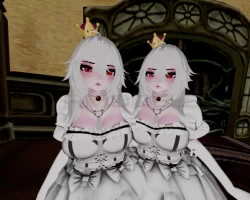


Model info
Content type:Avatars
Сreated by: From the Graves
SDK: 3.0 (VRChat)
Unity version: Unity 2019
Platform:
PC
Рhysbones: Yes
Face Tracking: Yes
Full body: Yes
Nsfw: Yes
DРS \ SPS : Yes
Views: 5 000
The Queen Boosette
To download the model, you need to log in.
Description
Physbones
•Boobs
•Butt
•Hair 1
•Hair 2
•Dress
•Piranha Plant
•Bell on Collar
•Umbrella
•Bows
Basic Toggles
•Bow
•Corset
•Crown
•Dress
•Harness
•Hip Bows
•Panties
•Particles
•Pasties
•Sleeves
•Umbrella
•Piranha Stroker
Color Radials (Can be combined with Hue Radials to create ANY color and ANY shade!):
•Bow Color Radial
•Corset Color Radial
•Dress Color Radial
•Gloves Color Radial
•Harness Color Radial
•Hip Bows Color Radial
•Panties Color Radial
•Sleeves Color Radial
Hue Radials (Can be combined with Color Radials to create ANY color and ANY shade!):
•Bow Hue Radial
•Corset Hue Radial
•Dress Hue Radial
•Gloves Hue Radial
•Harness Hue Radial
•Hip Bows Hue Radial
•Panties Hue Radial
•Sleeves Hue Radial
Hair Radial Menus
•Hair Up
•Hair Down
•119 Hair Textures
•119 Accent Hair Textures
•All Hair Textures also have a Hue Shift which allows you to fully choose what color palette you want for her!
Body Menu
•Ghost mode / human mode toggle
•Skin Tone Slider
•Eye Hue
•Boob Slider
•Butt Slider
Clone Menu
•Adds a clone that mirrors your avatar, other users can see this!
•Lock the clone in place using static mode
•Rotate the clone whichever way you want
•Scale the clone to whatever size you want
•Put the clone on your head! Why not!?
•Drop your clone anywhere in the world!
•Lock all the animations on the clone to have a different clone than yourself (using toggles, radial menus, etc.)
•Clone duplicates all animations, gestures, and mouth movement (visemes)
DPS Included! ( ͡❛ ͜ʖ ͡❛)
•Oral, Hands, Ass, Anal, Vag, Feet, Thighs, Tits, Piranha Stroker
Hand Gestures for Face Animations!
Hand drawn menu icons! by Spooky#0856
Upload Instructions
Use These in this order
•Unity 2019.
•VRSDK 3.0 only
•Poiyomi Pro (not Included)Poi toon may work, but I have not tested it.
•Raliv DPS if you want it.
•Import Unity Project
•Open Scene if it didn't automatically load
•If you have issues with toggles, delete the model in scene and add the prefab to the scene
•If textures are pink Select ALL materials in materials folder and change shader to poiyomi.
•Boobs
•Butt
•Hair 1
•Hair 2
•Dress
•Piranha Plant
•Bell on Collar
•Umbrella
•Bows
Basic Toggles
•Bow
•Corset
•Crown
•Dress
•Harness
•Hip Bows
•Panties
•Particles
•Pasties
•Sleeves
•Umbrella
•Piranha Stroker
Color Radials (Can be combined with Hue Radials to create ANY color and ANY shade!):
•Bow Color Radial
•Corset Color Radial
•Dress Color Radial
•Gloves Color Radial
•Harness Color Radial
•Hip Bows Color Radial
•Panties Color Radial
•Sleeves Color Radial
Hue Radials (Can be combined with Color Radials to create ANY color and ANY shade!):
•Bow Hue Radial
•Corset Hue Radial
•Dress Hue Radial
•Gloves Hue Radial
•Harness Hue Radial
•Hip Bows Hue Radial
•Panties Hue Radial
•Sleeves Hue Radial
Hair Radial Menus
•Hair Up
•Hair Down
•119 Hair Textures
•119 Accent Hair Textures
•All Hair Textures also have a Hue Shift which allows you to fully choose what color palette you want for her!
Body Menu
•Ghost mode / human mode toggle
•Skin Tone Slider
•Eye Hue
•Boob Slider
•Butt Slider
Clone Menu
•Adds a clone that mirrors your avatar, other users can see this!
•Lock the clone in place using static mode
•Rotate the clone whichever way you want
•Scale the clone to whatever size you want
•Put the clone on your head! Why not!?
•Drop your clone anywhere in the world!
•Lock all the animations on the clone to have a different clone than yourself (using toggles, radial menus, etc.)
•Clone duplicates all animations, gestures, and mouth movement (visemes)
DPS Included! ( ͡❛ ͜ʖ ͡❛)
•Oral, Hands, Ass, Anal, Vag, Feet, Thighs, Tits, Piranha Stroker
Hand Gestures for Face Animations!
Hand drawn menu icons! by Spooky#0856
Upload Instructions
Use These in this order
•Unity 2019.
•VRSDK 3.0 only
•Poiyomi Pro (not Included)Poi toon may work, but I have not tested it.
•Raliv DPS if you want it.
•Import Unity Project
•Open Scene if it didn't automatically load
•If you have issues with toggles, delete the model in scene and add the prefab to the scene
•If textures are pink Select ALL materials in materials folder and change shader to poiyomi.
