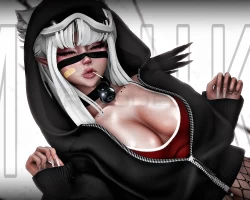
Home » Avatars » Miyuki

Model info

Content type:Avatars
Сreated by: kimiko
SDK: 3.0 (VRChat)
Unity version: Unity 2022
Platform: PC
Рhysbones: Yes
Face Tracking: No
Full body: Yes
Nsfw: Yes
DРS \ SPS : No
Views: 25 400
Miyuki

To download the model, you need to log in.
Screenshots of model Miyuki in the game
Comments: 8
Add comment

Information

To add your comment you need to log in.

  • foto
    Cris2000 #8
    The updated version doesnt need anything to fix tho fair warning, you need to add vrcfury and gogoloco because it doesnt come with it
    2 June 2026 08:01
  • foto
    Red Owl #7
    0
    I fixed it! Go to Playable Layers and press the X on all of the layers besides the FX.
    Base, Gesture, Additive and Action should all be default.
    I did also do what Furrybeaver suggested. Go the the FBX of Miyukinewer and do the blend shape normals, humanoid, and the jaw. Change nothing else and she should work.
    She also does not need anything added to her project, gesture manager is good just to make sure this solution has worked for you. Solo, FROTZYZ2, Snowba11b4byy, ordin,

    I fixed it! Go to Playable Layers and press the X on all of the layers besides the FX.
    Base, Gesture, Additive and Action should all be default.
    I did also do what Furrybeaver suggested. Go the the FBX of Miyukinewer and do the blend shape normals, humanoid, and the jaw. Change nothing else and she should work.
    She also does not need anything added to her project, gesture manager is good just to make sure this solution has worked for you. Solo, FROTZYZ2, Snowba11b4byy, ordin,
    10 May 2026 02:35
  • foto
    Red Owl #6
    0
    furrybeaver_, It seems for the model "miyukifixedddd" those steps have already been taken or corrected.
    But when trying to select "miyukinewer" as the avatar it does not work.
    9 May 2026 15:46
  • foto
    Solo #5
    0
    As anyone been able to fix the broken resting pose?
    5 May 2026 13:31
  • foto
    furrybeaver_ #4
    0
    Works if you know unity.
    Change supplied fbx 'mikyukifixedd' to humanoid in inspector > Rig, and once done, click 'configure' click the head, and make sure the 'jaw' is 'none' and save.
    Go to the Tab 'Model' and click 'Legacy Blend Shape Normals' and save.

    go the model you want to use (i used pale) and go to Inspector> Animator > and click 'avatar' and fixed 'miyukineweravatar'

    should be fixed, can test in gesture animator

    thought id mention since noone has yet.
    2 May 2026 23:49
  • foto
    FROTZYZ2 #3
    0
    The body is just in animation preview mode in game and in Unity when using GestureManager
    26 April 2026 09:39
  • foto
    Snowba11b4byy #2
    whole body broken face not even the same color
    12 April 2026 12:51
  • foto
    ordin #1
    +4
    To many ppl downlaoded it?
    8 April 2026 09:52