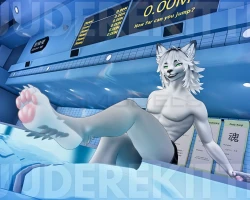


Model info
Content type:Avatars
SDK: 3.0 (VRChat)
Unity version: Unity 2022
Platform:
PC + Quest
Рhysbones: Yes
Face Tracking: Yes
Full body: Yes
Nsfw: Yes
DРS \ SPS : Yes
Views: 39 632
Asher, Male Grey Wolf
To download the model, you need to log in.
Description
Grey Wolf Male Avatar
PC + Quest Compatible
Hair Darkness Slider White-> Black
Full Clothing Toggles
Button-Down Shirt
Red
Black
White
Blue
Pink
Jeans
Grey
Blue
White
Black
Tee-Shirt
Plain White
White Graphic (Bad Boy)
Black Graphic (Scream)
Black Graphic (Playboy)
Plain Black
Boxers
Red/Black
Blue/Clouds
Purple/Black
Pink/Paws
Black/White
Cool Glasses Accessory
Eye Color RGB Hue Shift
VRC Face Tracking Installed
GoGoloco Installed
Upload Instructions
Make sure VRCFURY + Poiyomi Toon Shaders are installed in the VCC. You can install them here:
vrcfury
poiyomi
How to Upload for PC
Create New VCC Project (Avatars 2022)
Import Poiyomi Toon Shaders + VRCFURY in VCC Package Management
Open Project
Import Avatar Package, drag scene into hierarchy
Sign into SDK + upload selected version to PC
(If uploading for quest- copy the blueprint ID for part 2)
How to Attach Quest Version:
Upload PC Version First (instructions above)
Switch SDK To Android
Paste Blueprint ID from PC version into the Quest Version's blueprint ID slot
Upload! It will automatically attach
PC + Quest Compatible
Hair Darkness Slider White-> Black
Full Clothing Toggles
Button-Down Shirt
Red
Black
White
Blue
Pink
Jeans
Grey
Blue
White
Black
Tee-Shirt
Plain White
White Graphic (Bad Boy)
Black Graphic (Scream)
Black Graphic (Playboy)
Plain Black
Boxers
Red/Black
Blue/Clouds
Purple/Black
Pink/Paws
Black/White
Cool Glasses Accessory
Eye Color RGB Hue Shift
VRC Face Tracking Installed
GoGoloco Installed
Upload Instructions
Make sure VRCFURY + Poiyomi Toon Shaders are installed in the VCC. You can install them here:
vrcfury
poiyomi
How to Upload for PC
Create New VCC Project (Avatars 2022)
Import Poiyomi Toon Shaders + VRCFURY in VCC Package Management
Open Project
Import Avatar Package, drag scene into hierarchy
Sign into SDK + upload selected version to PC
(If uploading for quest- copy the blueprint ID for part 2)
How to Attach Quest Version:
Upload PC Version First (instructions above)
Switch SDK To Android
Paste Blueprint ID from PC version into the Quest Version's blueprint ID slot
Upload! It will automatically attach
