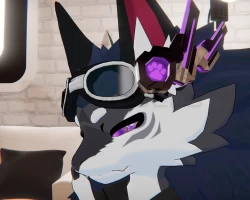


Cyber Headphones -MiraPhones (NovaBeast/and all Avatars) [ PC / Android ] $5+ MiraNaJanela
To download the model, you need to log in.
Description
Cyber Headphones
Cyber headphones is a stylish asset that will automatically activate with the earmuff, compatible with PC and Android.
Original designed for NovaBeast, but featuring easy adjustment with bones to fit any avatar. Easilycolor!
If eye tracking is properly configured, you'll be able to control the antenna with your eyes!
Modes:
The headphones have 2 modes:
Manual: You control and manually turn the headphones on and off.
Auto: It turns on and off automatically when you activate and deactivate the earmuff.
Details:
Polygons: 4.766
Materials: 1
Sync Parameters: 1
Dependencies:
VRCFury
Poiyomi 8.1
Installation:
PC :
Install VRCFury and Poiyomi.
Import the MiraPhones.unitypackage in your project.
Go to "_MiraNaJanela/MiraPhones/Prefabs" and drag the prefab MiraPhones to your avatar.
if you want to change the color of the headset, select the material and go to Emission Tab and change the color to your desirer
QUEST
Install VRCFury and Poiyomi.
Import the MiraPhones.unitypackage in your project.
Go to "_MiraNaJanela/MiraPhones/Prefabs" and drag the prefab MiraPhones to your avatar.
Replace the material with the Android version that is located at the "_MiraNaJanela/MiraPhones/Material".
if you want to change the color of the headset, select the material and go to Emission Tab and change the color to your desirer
Cyber headphones is a stylish asset that will automatically activate with the earmuff, compatible with PC and Android.
Original designed for NovaBeast, but featuring easy adjustment with bones to fit any avatar. Easilycolor!
If eye tracking is properly configured, you'll be able to control the antenna with your eyes!
Modes:
The headphones have 2 modes:
Manual: You control and manually turn the headphones on and off.
Auto: It turns on and off automatically when you activate and deactivate the earmuff.
Details:
Polygons: 4.766
Materials: 1
Sync Parameters: 1
Dependencies:
VRCFury
Poiyomi 8.1
Installation:
PC :
Install VRCFury and Poiyomi.
Import the MiraPhones.unitypackage in your project.
Go to "_MiraNaJanela/MiraPhones/Prefabs" and drag the prefab MiraPhones to your avatar.
if you want to change the color of the headset, select the material and go to Emission Tab and change the color to your desirer
QUEST
Install VRCFury and Poiyomi.
Import the MiraPhones.unitypackage in your project.
Go to "_MiraNaJanela/MiraPhones/Prefabs" and drag the prefab MiraPhones to your avatar.
Replace the material with the Android version that is located at the "_MiraNaJanela/MiraPhones/Material".
if you want to change the color of the headset, select the material and go to Emission Tab and change the color to your desirer
