

[VRChat] myxy Liquid Glass
To download the model, you need to log in.
Description
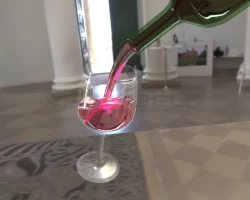
Basically you can pour from the bottle into a glass. pop the lid back on the bottle and it refills.
# Overview This is a drink asset for VRChat. You can pour the liquid into the glass. A sample world is available (https://vrchat.com/home/launch?worldId=wrld_b85ae69f-28d6-48bc-ba87-afa5c8cc137a) # Update history 2022-02-06 v1.0.0 Released 2022-02-06 v1 .0.1 Corrected interpolation processing of bubbles etc. 2022-02-07 v1.0.2 Corrected that sake was shiny, modified some rules 2022-02-08 v1.0.3 Corrected lighting processing 2022-02-08 v1.0.4 Fixed glass drawing update script (as pointed out by @dotdotw) 2022-02-09 v1.0.5 Fixed lighting process 2022-02-19 v1.1.0 Trial Quest support 2022-02- 22 v1.2.0 Implemented drink bar mechanism 2022-02-25 v1.2.1 Measures against black ink 2022-02-27 v1.2.2 Added English readme, added glass 2022-03-12 v1.2.3 SPS-I support, added poster 2022 -03-21 v1.2.4 Fixed sync issue 2022-05-11 v1.2.5 Fixed bubble drawing 2022-08-06 v1.2.6 Fixed volume calculation and reflection # How to useUnity 2019.4. I have confirmed the operation with 31f1. Please import the latest version of VRCSDK3 and UdonSharp before importing the bundled unitypackage. Each prefab in Assets/myxyLiquidGlass/Prefab corresponds to a glass or bottle and works by placing them in the scene. A bottle with a lid opens and closes with a click, and when closed, the liquid is restored. Shakers and flasks remember the liquid you poured when they were open. All glasses can be drunk without spilling with a long press. # Precautions for operation * The drawing may disappear due to some operation due to an unknown cause. It will be redrawn when you move the object or play the scene. * It looks better with a ReflectionProbe on the scene. * It is easy to select the Glass object inside by clicking on the scene when adjusting the position of the Prefab. Move and rotate the parent object of the Glass object. # Parameter explanation You can create various glasses by changing various parameters. The structure of glass is roughly * Pickup object - Cap object - Glass - Stream. You can set the color, shape and behavior of the glass with the UdonBehaviour and material parameters associated with the Glass object. It is difficult to set all parameters from scratch to create a glass, so we recommend modifying an existing Prefab. ## Only explain important parts Set the cap to UdonBehaviour's Cap. IsPourable allows it to be poured from another glass, and IsRecoverable recovers it when the cap is closed. Material Color-> WaterColor (Alpha is opacity) changes the color of the liquid. The Water surface transforma item determines the initial liquid volume and maximum recovery liquid volume. ## UdonBehaviour (Glass script) * Pendulum Mass - Parameters for surface movement. Mass of a virtual pendulum. * Pendulum Viscosity - Parameter for surface movement. Viscous drag of a virtual pendulum. * Pendulum Spring - Parameter for water surface movement. The spring constant of a hypothetical pendulum. * Height Scale Pendulum Length - Parameter for surface movement. A virtual pendulum height, scaled by the height of the glass. * Cap - Cap object. * Is Open - Controls the open state of the glass. It works automatically, so don't worry too much about it. * Is Pourable - Sets whether liquid can be poured from another glass. * Height Scale Full Open Speed - A basic value for water flow speed, scaled by the height of the glass. * Whole Volume Scale Recovery Volume Speed - Recovery speed. Scale by whole volume. * Whole Volume Scale Drink Volume Speed - The speed at which you drink. Scale by whole volume. * Gravity - The gravity vector. * Long Press Interval - Length of long press judgment. * Is Static Glass - Checks will make the glass do nothing. Used for shaker caps* Is Recoverable - Sets whether to recover when the lid is closed. * Is Disable Sparkling And Foam When Close - Disappears sparkling and beer foam when the lid is closed. * Is Infinite - Fluid never runs out. I wouldn't recommend it as it makes it heavy. * Stream Object - A reference to a water stream object * Action Counter Reset Time - Will work at least this number of seconds after you release your hand * Is Close On Exhaust - Automatically close the lid when the glass is empty * Is Interactable By Pickup - Opens and closes the lid when a GlassPickup that references Glass is interacted with. If Is Close On Exhaust is checked, just open the lid. ## Material ### Bottle shape * Shape - A texture that records the glass shape. It can be created in the scene inside the Template folder. * Thickness - The thickness of the glass * Bottom - The height of the bottom of the glass * BottomBottom - The bottom height of the bottom of the glass * EdgeShape - I was going to adjust the shape of the rim of the glass, but it doesn't work very well * NGon - Use if you want the shape of the glass to be partially prismatic. 2 is a cylinder, 3 or more is a prism. * CornerRadius - The corner radius of the prism. * Poly-Round Threshold - The length of the prism section. * Poly-Round Height - The height of the prism section. * Poly-Round Contrast - Smoothing of prismatic and cylindrical parts. ### Label * Label - The label texture. Alpha is transparency. * LabelPos- It is the height position of the label * LabelWidth - The width of the label * LabelHeight - The height of the label * IsTransparentLabel - Switches the label between translucent and opaque. * Cutout Threshold - Threshold for alpha cutout when opaque. ### Color * BottleColor - The color of the bottle. * WaterColor (Alpha is opacity) - The color of the liquid. The alpha value becomes the opacity. * WaterOpacity - Adjusts opacity due to liquid thickness. * Bottle Transparency - The opacity of the glass. ### Lighting * Reflectance - The reflectance of the glass. * WaterReflectance - Reflectance of liquids. * WaterRefraction - The refractive index of the liquid. * GrabDiff - Glass background distortion strength * GrabDiffWater - Liquid background distortion strength. ### Water surface shape * SurfaceTension - Area of influence of surface tension expression. * SurfaceTensionHeight - The height displacement of the surface tension representation. * WaveScale - The spatial granularity of the wave * WaveTimeScale - The temporal granularity of the wave * WaveHeightScale - The height of the wave ### Sparkling and foam * SparklingScale - The density of the sparkling. * SparklingSize - The size of the sparkling. If you make it too large, the coarseness will stand out. * SparklingSpeed - How fast the sparkling rises. *Sparkling Density- The probability that the sparkling will be emitted within the unit space. * Foam Thickness - The thickness of the beer foam. ### Water surface transform * Initial Height - Initial liquid volume. reflected on the scene. * Maximum Height - Maximum amount of liquid. * Maximum Height On Cap - The maximum amount of liquid when the cap is closed. I use it to reduce the height of the cork. ### Other * IsDisplayBottle - Switches display/hide of the bottle part * IsDisplayStream - Switches display/hide of the water flow part # About Dispenser Samples of the drink bar mechanism (DispenserTypeOpenClose, DispenserTypeExhaust) are placed in the sample scene. please refer. The difference from a normal bottle is the check of the Is Close On Exhaust and Is Interactable By Pickup options of the Glass object, and the hierarchy structure is slightly different for convenience, but it is not an essential difference. If Is Close On Exhaust is checked, the lid will not close until the bottle is completely empty, so we recommend turning it upside down. If you use it as a drink bar, etc., the bottle is in the way, so please uncheck IsDisplayBottle in the material. If you want to change the thickness of the water flow or the amount of liquid, change the scale of the Glass object. # About Quest support ver1.2. Assets before 0 had a problem that the liquid turned black when a PC user entered the Quest world with scripts disabled and the Quest user as a Master. Since the current problem is recognized as being solved, it is okay to disable it normally. # About Template If you change the value of the Template script of the Template object in the Template scene in the Template folder and press the Generate button, the texture for the glass shape will be generated in the Template folder. Please check Read/Write Enabled. # Terms Producer: It is prohibited to redistribute this asset and the production using this asset without myxy's permission. ## Prohibited actions: * Distributing the source code of this asset in a viewable state * Distributing software created using this asset or its modification data without permission ## Actions that are not prohibited * Production using this asset , The creator: myxy shall not be held responsible for any damage caused by using this asset that makes the uploaded VRChat world available to multiple people. These Terms are subject to change without notice. # Acknowledgment The bottle label was drawn by qchan949 (@qchan949). The SkyBox in the sample scene uses CC0 textures from (https://polyhaven.com/a/sepulchral_chapel_rotunda). # If you have any questions, please contact me via Booth message or: Twitter@3405691582 Mail: [email protected] com/a/sepulchral_chapel_rotunda) using CC0 textures. # If you have any questions, please contact me via Booth message or: Twitter@3405691582 Mail: [email protected] com/a/sepulchral_chapel_rotunda) using CC0 textures. # If you have any questions, please contact me via Booth message or: Twitter@3405691582 Mail: [email protected]
# Overview This is a drink asset for VRChat. You can pour the liquid into the glass. A sample world is available (https://vrchat.com/home/launch?worldId=wrld_b85ae69f-28d6-48bc-ba87-afa5c8cc137a) # Update history 2022-02-06 v1.0.0 Released 2022-02-06 v1 .0.1 Corrected interpolation processing of bubbles etc. 2022-02-07 v1.0.2 Corrected that sake was shiny, modified some rules 2022-02-08 v1.0.3 Corrected lighting processing 2022-02-08 v1.0.4 Fixed glass drawing update script (as pointed out by @dotdotw) 2022-02-09 v1.0.5 Fixed lighting process 2022-02-19 v1.1.0 Trial Quest support 2022-02- 22 v1.2.0 Implemented drink bar mechanism 2022-02-25 v1.2.1 Measures against black ink 2022-02-27 v1.2.2 Added English readme, added glass 2022-03-12 v1.2.3 SPS-I support, added poster 2022 -03-21 v1.2.4 Fixed sync issue 2022-05-11 v1.2.5 Fixed bubble drawing 2022-08-06 v1.2.6 Fixed volume calculation and reflection # How to useUnity 2019.4. I have confirmed the operation with 31f1. Please import the latest version of VRCSDK3 and UdonSharp before importing the bundled unitypackage. Each prefab in Assets/myxyLiquidGlass/Prefab corresponds to a glass or bottle and works by placing them in the scene. A bottle with a lid opens and closes with a click, and when closed, the liquid is restored. Shakers and flasks remember the liquid you poured when they were open. All glasses can be drunk without spilling with a long press. # Precautions for operation * The drawing may disappear due to some operation due to an unknown cause. It will be redrawn when you move the object or play the scene. * It looks better with a ReflectionProbe on the scene. * It is easy to select the Glass object inside by clicking on the scene when adjusting the position of the Prefab. Move and rotate the parent object of the Glass object. # Parameter explanation You can create various glasses by changing various parameters. The structure of glass is roughly * Pickup object - Cap object - Glass - Stream. You can set the color, shape and behavior of the glass with the UdonBehaviour and material parameters associated with the Glass object. It is difficult to set all parameters from scratch to create a glass, so we recommend modifying an existing Prefab. ## Only explain important parts Set the cap to UdonBehaviour's Cap. IsPourable allows it to be poured from another glass, and IsRecoverable recovers it when the cap is closed. Material Color-> WaterColor (Alpha is opacity) changes the color of the liquid. The Water surface transforma item determines the initial liquid volume and maximum recovery liquid volume. ## UdonBehaviour (Glass script) * Pendulum Mass - Parameters for surface movement. Mass of a virtual pendulum. * Pendulum Viscosity - Parameter for surface movement. Viscous drag of a virtual pendulum. * Pendulum Spring - Parameter for water surface movement. The spring constant of a hypothetical pendulum. * Height Scale Pendulum Length - Parameter for surface movement. A virtual pendulum height, scaled by the height of the glass. * Cap - Cap object. * Is Open - Controls the open state of the glass. It works automatically, so don't worry too much about it. * Is Pourable - Sets whether liquid can be poured from another glass. * Height Scale Full Open Speed - A basic value for water flow speed, scaled by the height of the glass. * Whole Volume Scale Recovery Volume Speed - Recovery speed. Scale by whole volume. * Whole Volume Scale Drink Volume Speed - The speed at which you drink. Scale by whole volume. * Gravity - The gravity vector. * Long Press Interval - Length of long press judgment. * Is Static Glass - Checks will make the glass do nothing. Used for shaker caps* Is Recoverable - Sets whether to recover when the lid is closed. * Is Disable Sparkling And Foam When Close - Disappears sparkling and beer foam when the lid is closed. * Is Infinite - Fluid never runs out. I wouldn't recommend it as it makes it heavy. * Stream Object - A reference to a water stream object * Action Counter Reset Time - Will work at least this number of seconds after you release your hand * Is Close On Exhaust - Automatically close the lid when the glass is empty * Is Interactable By Pickup - Opens and closes the lid when a GlassPickup that references Glass is interacted with. If Is Close On Exhaust is checked, just open the lid. ## Material ### Bottle shape * Shape - A texture that records the glass shape. It can be created in the scene inside the Template folder. * Thickness - The thickness of the glass * Bottom - The height of the bottom of the glass * BottomBottom - The bottom height of the bottom of the glass * EdgeShape - I was going to adjust the shape of the rim of the glass, but it doesn't work very well * NGon - Use if you want the shape of the glass to be partially prismatic. 2 is a cylinder, 3 or more is a prism. * CornerRadius - The corner radius of the prism. * Poly-Round Threshold - The length of the prism section. * Poly-Round Height - The height of the prism section. * Poly-Round Contrast - Smoothing of prismatic and cylindrical parts. ### Label * Label - The label texture. Alpha is transparency. * LabelPos- It is the height position of the label * LabelWidth - The width of the label * LabelHeight - The height of the label * IsTransparentLabel - Switches the label between translucent and opaque. * Cutout Threshold - Threshold for alpha cutout when opaque. ### Color * BottleColor - The color of the bottle. * WaterColor (Alpha is opacity) - The color of the liquid. The alpha value becomes the opacity. * WaterOpacity - Adjusts opacity due to liquid thickness. * Bottle Transparency - The opacity of the glass. ### Lighting * Reflectance - The reflectance of the glass. * WaterReflectance - Reflectance of liquids. * WaterRefraction - The refractive index of the liquid. * GrabDiff - Glass background distortion strength * GrabDiffWater - Liquid background distortion strength. ### Water surface shape * SurfaceTension - Area of influence of surface tension expression. * SurfaceTensionHeight - The height displacement of the surface tension representation. * WaveScale - The spatial granularity of the wave * WaveTimeScale - The temporal granularity of the wave * WaveHeightScale - The height of the wave ### Sparkling and foam * SparklingScale - The density of the sparkling. * SparklingSize - The size of the sparkling. If you make it too large, the coarseness will stand out. * SparklingSpeed - How fast the sparkling rises. *Sparkling Density- The probability that the sparkling will be emitted within the unit space. * Foam Thickness - The thickness of the beer foam. ### Water surface transform * Initial Height - Initial liquid volume. reflected on the scene. * Maximum Height - Maximum amount of liquid. * Maximum Height On Cap - The maximum amount of liquid when the cap is closed. I use it to reduce the height of the cork. ### Other * IsDisplayBottle - Switches display/hide of the bottle part * IsDisplayStream - Switches display/hide of the water flow part # About Dispenser Samples of the drink bar mechanism (DispenserTypeOpenClose, DispenserTypeExhaust) are placed in the sample scene. please refer. The difference from a normal bottle is the check of the Is Close On Exhaust and Is Interactable By Pickup options of the Glass object, and the hierarchy structure is slightly different for convenience, but it is not an essential difference. If Is Close On Exhaust is checked, the lid will not close until the bottle is completely empty, so we recommend turning it upside down. If you use it as a drink bar, etc., the bottle is in the way, so please uncheck IsDisplayBottle in the material. If you want to change the thickness of the water flow or the amount of liquid, change the scale of the Glass object. # About Quest support ver1.2. Assets before 0 had a problem that the liquid turned black when a PC user entered the Quest world with scripts disabled and the Quest user as a Master. Since the current problem is recognized as being solved, it is okay to disable it normally. # About Template If you change the value of the Template script of the Template object in the Template scene in the Template folder and press the Generate button, the texture for the glass shape will be generated in the Template folder. Please check Read/Write Enabled. # Terms Producer: It is prohibited to redistribute this asset and the production using this asset without myxy's permission. ## Prohibited actions: * Distributing the source code of this asset in a viewable state * Distributing software created using this asset or its modification data without permission ## Actions that are not prohibited * Production using this asset , The creator: myxy shall not be held responsible for any damage caused by using this asset that makes the uploaded VRChat world available to multiple people. These Terms are subject to change without notice. # Acknowledgment The bottle label was drawn by qchan949 (@qchan949). The SkyBox in the sample scene uses CC0 textures from (https://polyhaven.com/a/sepulchral_chapel_rotunda). # If you have any questions, please contact me via Booth message or: Twitter@3405691582 Mail: [email protected] com/a/sepulchral_chapel_rotunda) using CC0 textures. # If you have any questions, please contact me via Booth message or: Twitter@3405691582 Mail: [email protected] com/a/sepulchral_chapel_rotunda) using CC0 textures. # If you have any questions, please contact me via Booth message or: Twitter@3405691582 Mail: [email protected]
