Home » Other » Prefab » IkeHUD

Model info

Content type:Prefab
Сreated by: ikeiwa
Face Tracking: No
Full body: No
Nsfw: No
Views: 68 223
IkeHUD

To download the model, you need to log in.

Description


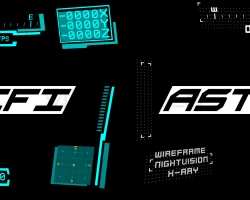
THIS IS THE SCI-FI SKIN
PC ONLY

◊ Realtime Mini-map with player radar
◊ Compass
◊ Instance session Clock
◊ Microphone state and volume
◊ 3 Different overlays : Wireframe, Night-Vision and XRay
◊ A ping system
◊ Easy to install with VRCFury
◊ Customizable
◊ Lots of pre-made visors and an easy to edit blend file

Requirements
◊ Unity 2022+
◊ VRChat Avatar SDK 3.6.0+
VRCFury 1.859.0+
◊ Final IK Stub


THIS IS THE Astral SKIN
Unity 2022 Only and not compatible QUEST/ANDROID !!!
Make sure to choose the right skin before buying (see below)
◊ Realtime Mini-map with player radar
◊ Compass
◊ Instance session Clock
◊ Microphone state and volume
◊ 3 Different overlays : Wireframe, Night-Vision and XRay
◊ A ping system
◊ Easy to install with VRCFury
◊ Customizable
◊ Lots of pre-made visors and an easy to edit blend file
Uploaded by

Anonymous


Comments: 22
Add comment

Information

To add your comment you need to log in.

  • foto
    nina_dragon_shy #22
    0
    assets --> IkeiwaHud ----> Skins ----> Astral ----> HUD
    15 February 2026 14:40
  • foto
    Qwertypdeb #21
    0
    RoxxiedaPunk, you don't need to add a parameter. You just put it in and position the visor on your face. It's already done the rest for you. All you need to do is drag and drop the prefab, then move it to your face. If it's still a struggle, see if a video on youtube helps. I can only help so much in text.
    16 November 2025 00:55
  • foto
    RoxxiedaPunk #20
    0
    Qwertypdeb, I'm having the same issue, i think the issue is that the opacity parameter isn't added in the parameters list, i added it in the parameters list, but didn't work in game, so i might've accidentally made it the wrong parameter type
    15 November 2025 11:13
  • foto
    Qwertypdeb #19
    0
    DivvyLuvv, works fine for me. Did you remember to install VRCFURY and Final IK stub? I forgot to install Final IK stub first time I added it to my avi.

    When you moved the hud, did did move the correct object? If I remember correctly, I moved the entire prefab. I also suggest checking the logs. Feel free to send the logs here and see if that gives any additional helpful info.

    I don't know if logs apply here, but it can be helpful for some. Debug and stuff.
    28 July 2025 10:19
  • foto
    DivvyLuvv #18
    Doesnt work. I watched the video on the creator's website a few times, followed ALL instructions, did exactly what it said to do, it's not working for me. In unity play mode, everything works FINE, but IN GAME nothing on the HUD is working except the ping thing. Idk what I'm doing wrong. I've tried doing the scifi first, then astral, now back on sci-fi one. I didn't import both at once or in the same project. I've tried diff visors, moving it in the head, on the eyes, around the head, nothing is working in game. I followed the requirements, unity 2022, newest SDK, and the stub. I really like this HUd thing for gaming worlds because is so fun. If anyone knows how to fix this, lmk please.
    30 April 2025 16:44
  • foto
    FuntimeVrGamer #17
    0
    Burga, Whats your discord if you mind so i can get it from you. Please and Thank You!
    7 March 2025 22:22
  • foto
    KireSaku #16
    -5
    missing tutorial ! not recommented to download
    7 March 2025 03:19
  • foto
    Josh425 #15
    +1
    This Is So Good Im Adding This To All Avatars I Make Now
    24 December 2024 03:56
  • foto
    Kurt Knispel #14
    0
    When using in gesture manager it works fine but when uploading it complains about missing scripts
    3 November 2024 06:05
  • foto
    therabbithole #13
    +9
    VoidUADragon, the biggest issue is things costing money. everything costs money, and if we could afford to support the creator I'm sure the majority of us here would, respectfully. but since most of us are poor and things cost money, we gotta get our kicks elsewhere where things don't cost money because it's probably the only fun we get out of the day. it's not the end of the world, there are plenty of people still willing to dole out cash for someone's asset, it's just not gonna be here more often than not. if you really wanna make a change, you could offer to buy it for people who can't afford it, that'd be the most helpful thing you could probably do.
    26 October 2024 14:07
  • foto
    EbonyPrince (user blocked for violating site rules) #12
    Unus_Annus,
    Don't forget the prerequisites VRCFURY, Final IK stub

    Unus_Annus, Don't have both skins on one project I got a error on upload, had to delete the folder then add the one I wanted.
    22 October 2024 01:10
  • foto
    WhitePowder #11
    0
    for some reason it gives me an error when uploading the astral skin
    21 October 2024 18:02
  • foto
    EbonyPrince (user blocked for violating site rules) #10
    Project Nexus, Thanks b, I got it working it's crazy hard part was pickin the skin
    21 October 2024 13:19
  • foto
    Project Nexus #9
    +2
    EbonyPrince, it works on anything
    21 October 2024 11:41
  • foto
    EbonyPrince (user blocked for violating site rules) #8
    Is this only for furry avis or can you get this to work on robots?
    21 October 2024 11:14
  • foto
    WhitePowder #7
    0
    Burga, can you share the skin with me?
    21 October 2024 03:17
  • foto
    NomNom #6
    VoidUADragon, Even our cat tries to intimidate us more than you do.
    anime145
    20 October 2024 15:33
  • foto
    virtualdog #5
    +9
    VoidUADragon womp womp. you have an account here, you're a hypocrite. chill out, keyboard vigilante. troll38
    20 October 2024 14:13
  • foto
    VoidUADragon (user blocked for violating site rules) #4
    ***comment deleted***
    20 October 2024 11:01
  • foto
    Burga #3
    0
    I have the astral skin if needed
    20 October 2024 07:37
  • foto
    MysticHorizon #2
    0
    I love this tool, thank you for the share!
    20 October 2024 07:30
  • foto
    owo33 #1
    0
    HAHAHAHAH TY! HAAAAAA

    YEEEES!
    20 October 2024 02:20